Summary: in this tutorial, you will learn how to use the
GROUP BY clause or ROW_NUMBER() function to find duplicate values in a table.
Technically, you use the
UNIQUE constraints to enforce the uniqueness of rows in one or more columns of a table. However, sometimes you may find duplicate values in a table due to the poor database design, application bugs, or uncleaned data from external sources. Your job is to identify these duplicate values in effective ways.
To find the duplicate values in a table, you follow these steps:
- First, define criteria for duplicates: values in a single column or multiple columns.
- Second, write a query to search for duplicates.
Let’s set up a sample table for the demonstration.
Setting up a sample table
Then, insert some rows into the
t1 table:
The
t1 table contains the following duplicate rows:
Your goal is to write a query to find the above duplicate rows.
Using GROUP BY clause to find duplicates in a table
This statement uses the
GROUP BY clause to find the duplicate rows in both a and b columns of the t1 table:
Here is the result:
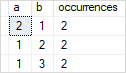
How it works:
- First, the
GROUP BYclause groups the rows into groups by values in bothaandbcolumns. - Second, the
COUNT()function returns the number of occurrences of each group (a,b). - Third, the
HAVINGclause keeps only duplicate groups, which are groups that have more than one occurrence.
To return the entire row for each duplicate row, you join the result of the above query with the t1 table using a common table expression (CTE):
Here is the output:
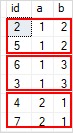
Generally, the query for finding the duplicate values in one column using the
GROUP BY clause is as follows:
The query for finding the duplicate values in multiple columns using the
GROUP BY clause :
Using ROW_NUMBER() function to find duplicates in a table
The following statement uses the
ROW_NUMBER() function to find duplicate rows based on both a and b columns:
Here is the result:
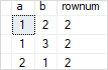
How it works:
First, the
ROW_NUMBER() distributes rows of the t1 table into partitions by values in the a and b columns. The duplicate rows will have repeated values in the a and b columns, but different row numbers as shown in the following picture: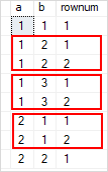
Second, the outer query removes the first row in each group.
Generally, This statement uses the
ROW_NUMBER() function to find the duplicate values in one column of a table:
In this tutorial, you have learned how to use the
GROUP BY clause or ROW_NUMBER() function to find duplicate values in SQL Server.


0 comments:
Post a Comment
Note: only a member of this blog may post a comment.