Summary: in this tutorial, you will learn how to delete duplicate rows from a table in SQL Server.
To delete the duplicate rows from the table in SQL Server, you follow these steps:
- Find duplicate rows using
GROUP BYclause orROW_NUMBER()function. - Use
DELETEstatement to remove the duplicate rows.
Let’s set up a sample table for the demonstration.
Setting up a sample table
First, create a new table named
sales.contacts as follows:
Second, insert some rows into the
sales.contacts table:
Third, query data from the
sales.contacts table:
The following picture shows the output of the query:
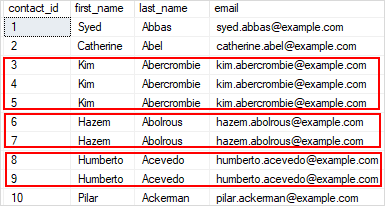
There are many duplicate rows (3,4,5), (6,7), and (8,9) for the contacts that have the same first name, last name, and email.
Delete duplicate rows from a table example
The following statement uses a common table expression (CTE) to delete duplicate rows:
In this statement:
- First, the CTE uses the
ROW_NUMBER()function to find the duplicate rows specified by values in thefirst_name,last_name, andemailcolumns. - Then, the
DELETEstatement deletes all the duplicate rows but keeps only one occurrence of each duplicate group.
SQL Server issued the following message indicating that the duplicate rows have been removed.
If you query data from the
sales.contacts table again, you will find that all duplicate rows are deleted.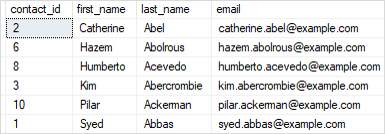
In this tutorial, you have learned how to delete duplicate rows from a table in SQL Server.


0 comments:
Post a Comment
Note: only a member of this blog may post a comment.