In this article, I am going to discuss the Generalized Async Return Types in C# with examples. Please read our previous article before proceeding to this article where we discuss ref locals and ref returns in C# with examples. Before understanding the generalized async return types in C#, let’s have a look at asynchronous programming and try to understand how it works.
If you have worked with the async methods, then you may know the async methods can have the following return types:
- Task<TResult>, this return is used when the async method that returns a value.
- Task, this return type is used when the async method does not return any value.
- void, this return type is used for an event handler.
Let us discussed each of these return types with examples.
The async method returning Task<T>
We need to use the Task<TResult> return type when the async method is going to return a value after the execution of the method using a return statement. In the following example, the GetLeisureHours() async method returns an integer value by using the return statement. So, we specify the GetLeisureHours() async method return type as Task<int>.
The ShowTodaysInfo() async method is going to return a string. So, the return type of this async method is Task<string>. One more point that you need to remember is whenever you want to call an async method from another async method then you need to use the await keyword while calling the method. In our example, we are calling the GetLeisureHours() async method from the ShowTodaysInfo() async method and you can see while the GetLeisureHours() async method we use the await keyword.
The FromResult async method is a placeholder for an operation that returns a string. The complete example is given below.
OUTPUT:

For a better understanding of how this happens let’s separate the call to GetLeisureHours() async method from the application of await as the following code shows.
OUTPUT:

Note: The Result property that we used to retrieve the value is a blocking property. It means if we try to access the value before the async method completes its task, then the thread which is currently active is blocked until the task completes and the value is available. In most of the real-time applications, we need to access the value by using the “await” keyword instead of accessing the property directly. But the point that you need to keep in mind is that you can only use the await property from within an async method.
The async method returning Task
We need to use the Task return type when the async method is not returning any value after the execution of the method. It means the async method either does not have a return statement in it or it may contain a return statement that doesn’t return an operand. Such type of async methods returns void if they run synchronously.
If we have an async method with Task return type and if we want our caller method to wait until the async method completes its execution then we need to use the await operator while calling the async method.
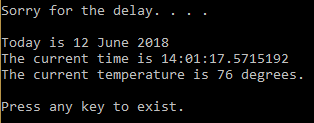
In the following example, the WaitAndApologize() async method return type is Task as it doesn’t have a return statement. We are calling this WaitAndApologize() async method from the DisplayCurrentInfo() async method. As we want to wait until the WaitAndApologize() method completes its execution so when calling this method from within the DisplayCurrentInfo() method we use the await operator.
Again from our Main() method, we are calling the DisplayCurrentInfo() async method and our requirement is to wait until the DisplayCurrentInfo() method complete its execution, so here we using the Wait() method while calling the DisplayCurrentInfo() method. We can not use the await operator here because the Main method is not an async method. As we know we can use the await operator only within an async method.
OUTPUT:

The following code separates calling the WaitAndApologize method from awaiting the task that the method returns.
OUTPUT:
Async method returning void
We need to use the void return type when the async method does not return any value. Then you may have one question in your mind what is the difference between Task and void return type as both are going to used when the async method does not return any value.
The difference is that if you use the void return type then the async method cannot be awaited. That means the caller of such method (void return async method) do not have any option to wait for the async method to complete its work. They simply call the async method and continue their work. So if you have methods other than event handlers which don’t return any value, it’s always advisable to use Task return type instead of void.
The following example defines an async event handler.
OUTPUT:

I hope now you have some idea regarding the async method in C#. So, let us move to our main topic of this article i.e.Generalized Async Return Types in C#.
Understanding the Generalized Async Return Types in C#
As of now of this article, we have discussed the async method with return type Task, Task<T>, and void. The most important point that you need to keep in mind is that the Task is a class. We also know the reference types behave differently in C#. In some situation, it is better to return anything rather than a Task.
The generalized async returns types in C# mean you can return a lightweight value type instead of a reference type to avoid additional memory allocations. From C# 7, there is an inbuilt value type ValueTask <T> which can be used instead of Task<T>.
.NET Framework provides the System.Threading.Tasks.ValueTask<TResult> as a light-weight implementation of a generalized task-returning value. To use the System.Threading.Tasks.ValueTask<TResult> type, you must add the System.Threading.Tasks.Extensions NuGet package to your project.
Let us understand Generalized Async Return Types in C# concept with an example.
OUTPUT:
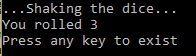
You may be thinking that we are talking about the term generalized async, but here we are getting only ValueTask<T>. So, I would like to clarify doubt that you can also create your own type which can be the return type of your async method. However, if you do not want to create your own type, then you can use the ValueTask<T> which is already available.
In the next article, I am going to discuss the Expression Bodied Members in C# with some examples.
SUMMARY
In this article, I try to explain Generalized Async Return Types in C# step by step with some simple examples. I hope this article will help you with your need. I would like to have your feedback. Please post your feedback, question, or comments about this article.


0 comments:
Post a Comment
Note: only a member of this blog may post a comment.