Setup Ionic 2 with Electron (TypeScript, Angular2)
Recently i faced the challenge to create a cross platform application for desktop, mobile and browser. Since Angular 2 Material is not yet ready but a Angular 1 to Angular 2 migration would be a pain in the ass I decided to go with Ionic 2 as scaffold for all devices. And then, when Angular 2 Material is ready it should replace Ionic 2 on Desktop and in Browser.
1.) The set up with was surprisingly easy. First of all make sure to have ionic 2 installed.
2.) To kickstart the Ionic 2 project. TypeScript is not required, but recommended, although you can do anything shown here with JavaScript as well.
3.) Browse to your app and install electron.
4.) Now go to your package.json file and add the required scripts for electron to start in dev mode with auto reload and in dist without.
5.) So your full package.json should look like this:
6.) Next step is to create the in “main” mentioned electron.js script. This script is basically the setup for your electron app.
7.) Your project structure will now look like this:
8.) Thats it! Now you can fire it up:
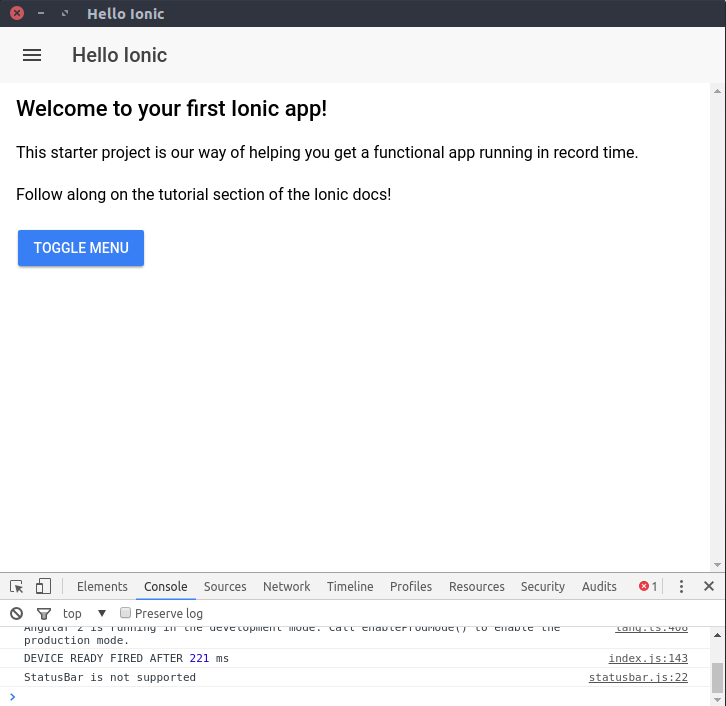 Ionic 2 running in Electron
Run Ionic 2 in Electron always in Windows Design
By default Ionic 2 runs in Material Design if no special platform is detected (e.g. when running in browser. But also when running on Linux Electron!). So you might want your electron App to run with Windows Theme on all platforms. The simplest way to do so is to add a Ionic Config Parameter to the URL. They have to be prefixed with “Ionic” and the fist letter is always uppercase. See the given example below of the modified electron.js.


0 comments:
Post a Comment
Note: only a member of this blog may post a comment.